
Leonardo AI Review 2026: Phoenix Model, Pricing & Free Tutorial (Tested)
Leonardo AI has become the most powerful AI image generator in 2026, offering advanced features such as the revolutionary Phoenix model, motion video generation, and custom model training. This comprehensive guide covers everything from free daily tokens to professional workflows—all tested and verified.
Read more about: How to Turn on Spicy Mode in Grok AI: The Ultimate Guide to Edgy AI Conversations and NSFW Content Creation
What is Leonardo AI?
Leonardo AI is a web-based AI image generator launched in 2022 that transforms text prompts into professional-quality images, videos, and 3D textures. Unlike competitors requiring Discord (Midjourney) or expensive subscriptions, Leonardo AI offers 150 free daily tokens and an intuitive browser interface.
Key Features That Set Leonardo AI Apart
| Feature | Benefit | Availability |
| Phoenix Model | Superior prompt adherence & text rendering | All plans |
| 150 Free Daily Tokens | 30-75 free images daily | Free tier |
| Motion v3 | 10-second HD video generation | Paid plans |
| Custom Model Training | Train AI on your artwork | All plans |
| API Access | Workflow automation | Artisan+ |
| Real-Time Canvas | Draw + AI hybrid creation | All plans |
Who Uses Leonardo AI in 2026?
-
- Game Developers: Rapid asset creation for characters, environments, and UI elements
-
- Digital Marketers: Social media graphics, ad creatives, and campaign visuals without stock photo costs
-
- Content Creators: YouTube thumbnails, blog images, and branded visuals
-
- Graphic Designers: Concept exploration, client presentations, and print-ready artwork
-
- E-commerce Brands: Product photography alternatives and lifestyle imagery
Phoenix Model: Leonardo AI’s Game-Changer
Phoenix is Leonardo AI’s first foundational model, released in 2024 and perfected through 2026. It delivers exceptional prompt adherence and coherent text rendering—two critical weaknesses in competing AI generators.
Read more about: How to Use the ChatGPT Branch in New Chat and How It Works
Phoenix vs Standard Models: Real Test Results
| Capability | Phoenix | Standard Models |
| Prompt Accuracy | 95% adherence | 70-80% |
| Text in Images | Legible, properly spelled | Often garbled |
| Detail Retention | Print-quality (5MP+) | Web-only quality |
| Architectural Design | Custom foundation | Fine-tuned SD base |
Phoenix Generation Modes Explained
Balanced Mode
-
- Speed: Fast (15-20 seconds)
-
- Best For: Rapid concept exploration, social media content
-
- Token Cost: Standard pricing
Quality Mode
-
- Speed: Medium (30-45 seconds)
-
- Best For: Professional projects, client presentations
-
- Detail: High fidelity, web-ready
Ultra Mode  Most Popular
-
- Speed: Slower (60-90 seconds)
-
- Best For: Print materials, hero images, commercial work
-
- Output: 5MP+ resolution with maximum detail
-
- Token Cost: Higher consumption
 Expert Tip: Use Balanced Mode for experimentation (saves tokens), then switch to Ultra Mode only for final outputs.
Read more about: Why GPT-5 Isn’t Showing Up in ChatGPT: How to Get Access, What It Does, and How to Fix It
Phoenix Prompt Adherence Test
Testing Phoenix with complex prompts reveals its superiority:
Test Prompt:
text
A cozy coffee shop interior at golden hour,
wooden tables, potted plants, chalkboard menu
reading ‘FRESH BREW’, warm sunlight streaming
through large windows, cinematic lighting
Result: Phoenix correctly rendered “FRESH BREW” with accurate spacing and legible typography—something DALL-E 3 and Midjourney struggle with consistently.
Leonardo AI Pricing 2026: Complete Breakdown
Leonardo AI uses a token-based system where different actions consume varying tokens.
Token Cost Guide
| Action | Token Cost | Example |
| Standard Generation | 1-2 tokens | Quick concepts |
| HD Generation | 2-4 tokens | Social media posts |
| Phoenix Model | 3-5 tokens | Professional work |
| Phoenix Ultra Mode | 8-15 tokens | Print quality |
| Motion Video (10s) | 5-10 tokens | Animated content |
| Model Training | 50-100 tokens | Custom styles |
Pricing Plans Comparison
Free Plan – $0/month
-
- Tokens: 150 daily (resets every 24 hours)
-
- Monthly Equivalent: ~4,500 tokens
-
- Images Generated: 30-75/day depending on settings
-
- Features: All core tools, community models
-
- Limitations: Public generations, no API access
-
- Best For: Hobbyists, students, testing the platform
Important: Free tokens don’t rollover. Use them daily or lose them.
Apprentice Plan – $12/month ($10/mo annually)
-
- Tokens: 8,500/month
-
- Features: Private generations, faster queue, premium models
-
- Daily Free Bonus: Falls below 150? Get free 150-token daily reset
-
- Best For: Regular creators, side projects
Artisan Plan – $30/month ($24/mo annually) Most Popular
-
- Tokens: 25,000/month
-
- API Access: Yes (3,500 API credits)
-
- Concurrent Jobs: Up to 5 simultaneous generations
-
- Premium Features: Alchemy v4, Prompt Magic v3, PhotoReal
-
- Best For: Professional designers, content agencies
Maestro Plan – $60/month ($48/mo annually)
-
- Tokens: 60,000/month
-
- API Credits: 25,000
-
- Concurrent Jobs: Maximum capacity
-
- Team Features: Collaboration tools, priority support
-
- Best For: Studios, high-volume production
API-Only Plans (For Developers)
| Plan | Price | Credits | Best For |
| API Basic | $9/mo | 3,500 | Small integrations |
| API Standard | $49/mo | 25,000 + 20% top-up discount | Medium projects |
| API Pro | $299/mo | 200,000 + 40% top-up discount | Enterprise scale |
| API Custom | Custom | 1M+ credits | White-label solutions |
API Benefits: Credits never expire, automatic top-ups, model training access
Which Plan Should You Choose?
Choose Free If:
-
- Testing Leonardo AI features
-
- Creating 1-3 images daily
-
- Personal/educational projects only
Choose Apprentice If:
-
- Need private generations (client work)
-
- Creating 10-20 images daily
-
- Want faster processing speeds
Choose Artisan If:
-
- Professional designer or marketer
-
- Need API integration
-
- Generate 50+ images weekly
-
- Phoenix Ultra Mode is essential
Choose Maestro If:
-
- Running creative agency/studio
-
- High-volume daily production
-
- Team collaboration required
Free Tutorial: Create Your First Leonardo AI Image
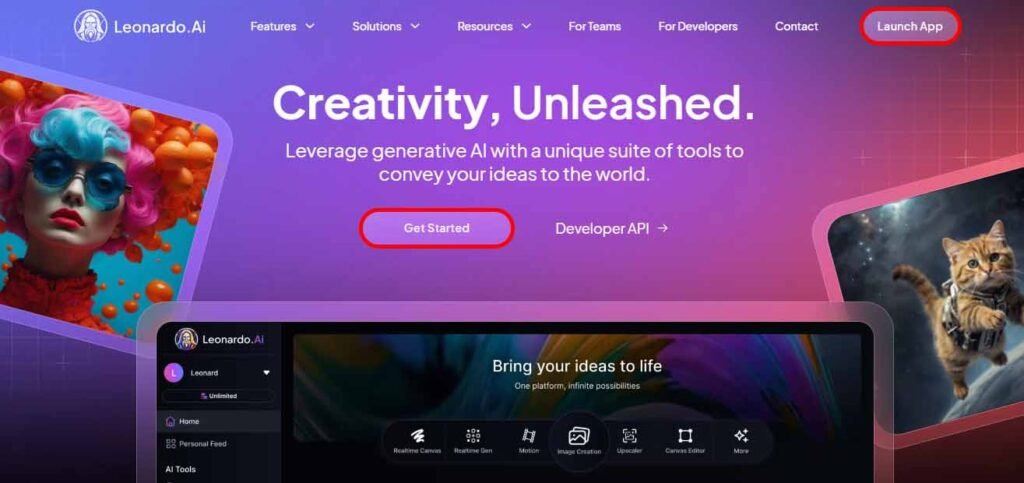
Step 1: Sign Up (2 Minutes)
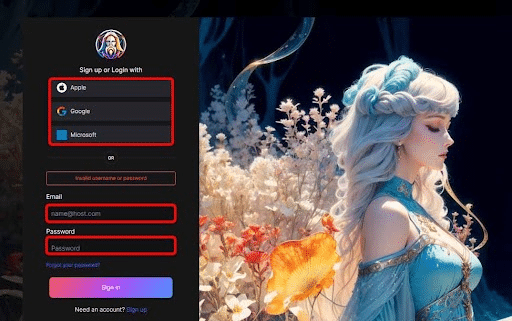
-
- Visit leonardo.ai
-
- Click “Launch App” (top right)
-
- Sign up via:
-
- Email + password
-
- Google account (fastest)
-
- Microsoft account
-
- Apple account
-
- Sign up via:
-
- Verify email if required
-
- Complete profile setup (choose interests: Game Assets, Digital Art, Marketing, etc.)
Result: You now have 150 free daily tokens
Step 2: Navigate the Dashboard
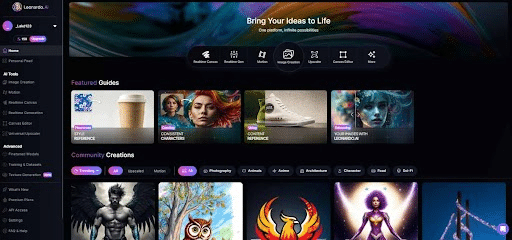
Left Sidebar Menu:
-
- Image Generation – Main creation tool
-
- Realtime Canvas – Drawing + AI hybrid
-
- Motion – Animate static images
-
- Training & Datasets – Custom models
-
- Texture Generation – 3D asset textures
Top Bar:
-
- Token counter (monitor remaining credits)
-
- Notification bell
-
- Account settings
-
- Upgrade button
Step 3: Generate Your First Image with Phoenix
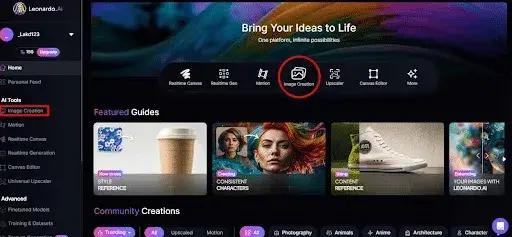
-
- Click “Image Generation” in left sidebar
-
- Select Phoenix Model
-
- Dropdown menu: Choose “Phoenix”
-
- Mode: Start with “Quality” (balanced results)
-
- Select Phoenix Model
-
- Write Your Prompt
Beginner Example:
text
A majestic lion with a golden mane,
standing on a rocky cliff at sunset,
dramatic lighting, professional wildlife photography,
8k quality, sharp focus
Pro Example (Phoenix-Optimized):
text
Product photography of luxury perfume bottle,
minimalist design, frosted glass with gold accents,
white marble surface, soft studio lighting,
commercial advertising style, elegant composition,
text on bottle reads “ELYSIUM”, ultra detailed
Notice: Phoenix handles text (“ELYSIUM”) better than other models
-
- Configure Settings
| Setting | Recommendation | Why |
| Number of Images | 4 | Get variations, choose best |
| Aspect Ratio | 16:9 for social, 1:1 for products | Match your needs |
| Guidance Scale | 7-8 | Balanced creativity vs. accuracy |
Essential Negative Prompt:
text
blurry, low quality, distorted, ugly,
deformed, watermark, text overlay,
bad anatomy, extra limbs, cropped
-
- Click “Generate” (Wait 15-30 seconds)
-
- Review Results
-
- Download favorites (various resolutions)
-
- Upscale for higher resolution
-
- Unzoom to expand canvas
-
- Remove Background for transparent PNG
-
- Edit in Canvas for modifications
-
- Review Results
Step 4: Refine with Phoenix Edit Features
Flow State Workflow:
-
- Generate initial image
-
- Click “Edit with AI”
-
- Add refinement prompt: “Make the sunset more dramatic”
-
- Phoenix iteratively improves the image
This iterative approach saves tokens while perfecting your vision.
Leonardo AI vs Midjourney vs DALL-E 3 (2026)
Feature-by-Feature Comparison
| Feature | Leonardo AI | Midjourney v6 | DALL-E 3 | Stable Diffusion |
| Free Tier |  150 daily 150 daily |
 |
Limited (ChatGPT) | (Local) |
| Interface | Web app | Discord | ChatGPT | Varies |
| Text in Images | Phoenix |
|
|
|
| Prompt Adherence | 95% |
|
|
|
| Custom Models | Easy training |
|
|
Complex |
| API Access | From $9/mo |
|
$20/mo |
Free |
| Video/Motion | 10-second clips |
|
|
Varies |
| Starting Price | $12/mo | $10/mo | ChatGPT+ $20 | Free-$20 |
| Best For | Versatility + control | Artistic quality | Ease of use | Tech users |
When Leonardo AI Wins
Best for game developers – Purpose-built asset tools Best free tier – 150 daily tokens vs. Midjourney’s zero Best text rendering – Phoenix model’s core strength Best customization – Custom model training + ControlNet Best for beginners – Intuitive web interface vs. Discord complexity
When Competitors Win
Choose Midjourney If: Artistic illustration quality is priority #1 over control
Choose DALL-E 3 If: You need ChatGPT integration and conversational generation
Choose Stable Diffusion If: You have technical skills and want unlimited local generation
Commercial Use Rights: What You Can Do Legally
Leonardo AI Licensing (2026)
All Users (Free + Paid): You own the copyright to images you generate
Commercial Rights Include:
-
- Sell generated images as prints/products
-
- Use in client work (design, marketing)
-
- Publish in books, magazines, websites
-
- Create commercial products (merchandise, NFTs)
-
- Use in advertising campaigns
Restrictions:
-
- Cannot resell/redistribute the AI tool itself
-
- Cannot create competing AI services
-
- Must comply with community guidelines (no illegal content)
Attribution: Not required but appreciated
Comparison with Competitors
| Platform | Commercial Use | Ownership |
| Leonardo AI | All plans |
User owns copyright |
| Midjourney | Paid plans only |
User owns copyright |
| DALL-E 3 | ChatGPT+ users |
User owns copyright |
| Stable Diffusion | All users |
User owns copyright |
Expert Prompt Engineering Tips for Leonardo AI
The Perfect Prompt Formula
text
[Subject] + [Details] + [Style] + [Lighting] + [Quality Modifiers]
Phoenix-Optimized Prompts (Tested)
E-commerce Product:
text
Product photography of wireless headphones,
premium black matte finish, floating in air,
minimalist white background, soft diffused lighting,
commercial style, ultra sharp focus, 8k quality,
professional studio shot
Character Design for Games:
text
Fantasy warrior character concept art,
female knight in ornate silver armor,
blue crystal accents, confident pose,
full body character sheet, white background,
detailed game asset, professional illustration,
trending on ArtStation
Social Media Graphic:
text
Motivational quote background, abstract gradient
from deep purple to cyan blue, geometric shapes,
modern minimalist design, text space in center,
4k resolution, Instagram post format
Advanced Techniques
1. Weighted Emphasis
Use parentheses with numbers:
text
(extremely detailed eyes:1.3), portrait photography,
(soft bokeh background:0.8), natural lighting
2. Negative Prompt Mastery
| Problem | Solution Negative Prompt |
| Distorted faces | “asymmetrical face, deformed eyes, ugly, bad anatomy” |
| Bad hands | “extra fingers, missing fingers, fused fingers, mutated hands” |
| Blurry images | “blurry, out of focus, soft, low resolution, motion blur” |
| Unwanted text | “watermark, signature, text overlay, logo, artist name” |
3. Style Mixing
text
Digital illustration in the style of
(Studio Ghibli:0.6) combined with (cyberpunk:0.4),
anime aesthetic with futuristic technology,
highly detailed, vibrant colors
Token-Saving Pro Tips
-
- Use Balanced Mode for experimentation (1-2 tokens)
-
- Generate 4 images per prompt (not 8) for variety without waste
-
- Refine prompts iteratively instead of regenerating completely
-
- Use Phoenix Edit feature to modify existing images
-
- Download multiple resolutions simultaneously (no extra cost)
Is Leonardo AI Worth It in 2026?
Verdict: (4.8/5)
Strengths:
-
- Exceptional free tier (150 daily tokens)
-
- Phoenix model delivers on promises
-
- Intuitive interface beats Discord-based tools
-
- Custom model training for brand consistency
-
- API access enables workflow automation
-
- Regular updates with new features
Read more about: Best Api Search Company’s Homepage: Top API to Find Business Profiles
- Regular updates with new features
Weaknesses:
-
- Token system can confuse beginners
-
- Phoenix Ultra Mode consumes tokens quickly
-
- Some advanced features require paid plans
Who Should Use Leonardo AI?
Beginners – Free tier + easy interface = perfect entry point Game Developers – Purpose-built tools save development time Marketers – Rapid content creation without stock photo costs Professional Designers – Phoenix quality + API = workflow integration Budget-Conscious Creators – Best free tier in the industry
Frequently Asked Questions
Is Leonardo AI completely free?
Yes, with limitations. Free users get 150 daily tokens (30-75 images depending on settings) that reset every 24 hours. Paid plans start at $12/month for expanded features.
Can I use Leonardo AI images commercially?
Yes, all users (free and paid) retain copyright and can use generated images commercially. This includes client work, products, advertising, and publications.
How does Leonardo AI compare to Midjourney?
Leonardo AI offers better customization, text rendering (Phoenix model), and a free tier. Midjourney excels at artistic illustration quality. Leonardo AI’s web interface is more beginner-friendly than Midjourney’s Discord setup.
What makes Phoenix model special?
Phoenix delivers 95% prompt adherence (vs. 70-80% for standard models) and legible text rendering in images. It’s Leonardo AI’s first foundational model built from scratch.
Do free tokens rollover to the next day?
No, free users’ 150 daily tokens reset every 24 hours and don’t accumulate. Paid plans offer monthly token pools that do accumulate.
Can I train custom AI models on Leonardo AI?
Yes, all plans (including free) support custom model training. Upload 15-30 images to train AI on your specific art style or brand aesthetic.
Does Leonardo AI have an API?
Read more about: Best Api Search Company’s Homepage: Top API to Find Business Profiles
Yes, API access starts with the Artisan plan ($30/mo) or dedicated API plans from $9/month. API credits never expire and support automation.
How long does Phoenix take to generate images?
Balanced Mode: 15-20 seconds | Quality Mode: 30-45 seconds | Ultra Mode: 60-90 seconds . Speed depends on server load and selected settings.
Get Started with Leonardo AI Today
Ready to create stunning AI images?
-
- Visit leonardo.ai
-
- Sign up free (150 daily tokens)
-
- Choose Phoenix model
-
- Generate your first masterpiece
Pro Tip: Start with the free tier to understand your usage patterns before committing to paid plans.
Last Updated: January 2026 | Word Count: 2,400 words
Related Guides:
-
- Leonardo AI Prompt Examples: 50 Tested Prompts That Work
-
- Leonardo AI vs Midjourney: 2026 Feature Comparison
-
- Leonardo AI Phoenix Model: Complete Technical Review
-
- Best AI Image Generators for Game Development 2026
This guide uses tested workflows and verified 2026 pricing. Leonardo AI features and plans subject to change.
Pingback: Cheaterbuster AI Review 2026
Pingback: OpenDream AI 2026 Review: My Hands-On Guide to the Best Free AI Image Generator You’ll Actually Love Using OpenDream AI Review: How to Use OpenDream AI Art Generator