
What Is Bing AI Image Generator?
The Bing AI Image Generator (previously Bing Image Creator) is Microsoft’s text‑to‑image tool that turns your written prompts into original images you can use in presentations, social media, websites, and campaigns.
It’s powered by cutting‑edge models, including systems based on DALL‑E technology and Microsoft’s proprietary MAI‑Image‑1, and it’s tightly integrated with Bing search, Copilot, and Microsoft Designer.
In practice, you open a browser, type something like “futuristic cityscape at night, photorealistic,” and get multiple unique images to download in seconds—no traditional design software required. The generator supports many languages and is positioned as a free AI image generator accessible to both professionals and casual users.
Learn How to Turn On Grok AI Spicy Mode
How Bing AI Image Creator Works
How Bing AI‑Generated Images Are Created
On a technical level, Bing AI Image Generator uses large generative models trained on massive sets of text‑image pairs to predict how an image that matches your sentence should look. When you type a prompt, the model encodes your text, samples noise, and iteratively “denoises” it into an image that reflects your description, composition, and style choices.
What the Process Looks Like for Users
For users, the workflow is very straightforward:
- Sign in with a Microsoft account
- Log in using your existing Microsoft account; there’s no separate registration for the image generator.
- Go to the Bing AI Image Generator
- Visit bing.com/create (Bing Create / Bing Image Creator page), or open Copilot / Bing Chat in Microsoft Edge.
- Enter your prompt and settings
- Type a detailed prompt and optionally choose a model (MAI‑Image‑1, DALL‑E 3, or standard) and a creation speed (fast or standard).
- Generate and refine
- Click Create and Bing generates multiple variations; pick your favorite, download it, share it, or open it in Microsoft Designer for further editing like text overlays, background removal, and layout tweaks.
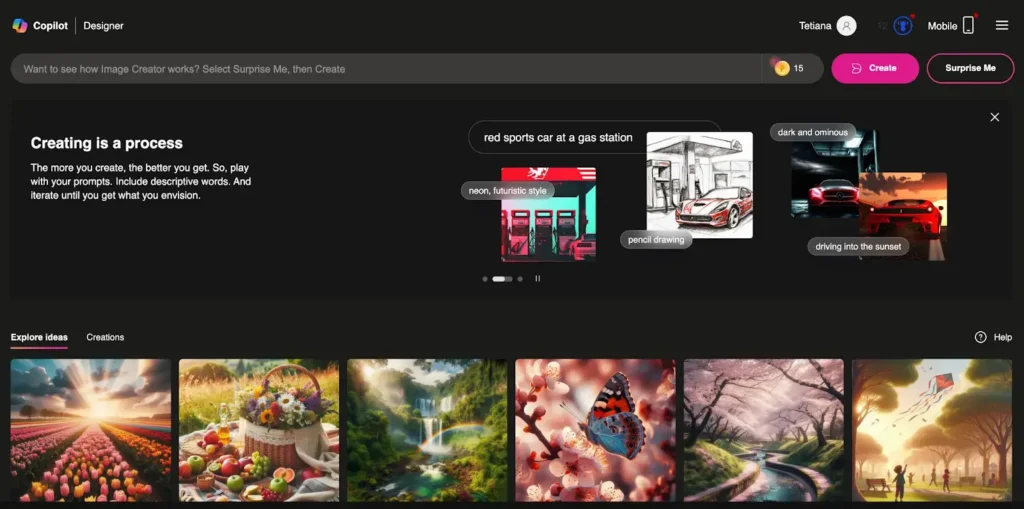
Step‑by‑Step Guide: How to Use Bing AI Image Generator
Using Bing Create (bing.com/create)
- Log in with a Microsoft account
- Use your personal Microsoft account; you don’t need a separate signup for Bing AI Image Creator.
- Access Bing Create
- Go to bing.com/create in any browser (Edge, Chrome, etc.) or search for “Bing image creator” in Bing.
- Join and start creating
- If you’re new, click “Join and create”; returning users go directly to the main prompt box.
- Write a clear, descriptive prompt
- Bing recommends using a descriptive phrase rather than a single keyword, then clicking Create to generate images.
- Download, share, or customize
- Bing returns several images; you can Share, Save, Download, or Customize them in Microsoft Designer for text, background removal, and layout adjustments.
Using Bing AI Image Generator in Bing Chat / Copilot

- Open Bing Chat / Copilot
- Launch Bing Chat / Copilot in Microsoft Edge or go to bing.com/chat and sign in with your Microsoft account.
- Describe the image in natural language
- For example: “Make an image of a robot astronaut nearing an alien planet, cinematic lighting, 16:9.”
- Refine directly in chat
- Images appear inside the chat; you can request new variations, adjust style (e.g., watercolor, digital art), and download or open in Designer for deeper edits.
Using Bing AI Image Generator on Mobile & Copilot App
- Install the Bing app or use Copilot on Windows
- Get the Bing app for Android or iOS, or access Copilot on supported Windows versions.
- Prompt by voice or text
- Speak or type your description, then generate visuals you can save to your device or share directly to social platforms.
Features, Strengths & Limitations
Bing AI Image Generator is designed to be beginner‑friendly but also competes with tools like Midjourney, DALL‑E, Stable Diffusion, and Canva, so users care about its trade‑offs.
Advantages and Disadvantages of Bing AI Image Generation
| Aspect | Strengths | Limitations |
| Ease of use | Simple, browser‑based interface; available via Bing Create, Copilot, Edge sidebar, and mobile apps. | Fewer advanced options and parameters than tools like Stable Diffusion and Midjourney. |
| Speed & access | Fast generations in fast creation mode; about 15 free fast image “boosts” per day that reset daily. | After boosts are used, the system switches to standard mode, which is noticeably slower. |
| Image quality | Produces high‑quality, realistic images, 3D renders, and stylized art suitable for marketing visuals. | Still shows AI artifacts such as distorted hands, faces, and messy in‑image text. |
| Cost | Core usage is free with a Microsoft account; additional boosts and benefits can be accessed through Microsoft Rewards and some Copilot plans. | Heavy users may need Copilot Pro or related subscriptions to unlock more fast generations and convenience. |
| Integration | Deep integration with Microsoft Designer, Office, Edge, and Bing search, ideal for existing Microsoft users. | Less attractive for people outside the Microsoft ecosystem or those wanting offline / local generation. |
| Safety & policy | Strong safety filters, watermarks, and content credentials to identify AI‑generated images and promote responsible use. | Strict censorship on controversial topics, deepfakes, explicit content, and certain celebrity/race prompts. |
This combination of quality, speed, and free access is why “Bing AI image generator” behaves like a high‑intent keyword among casual creators, students, and marketers in 2025–2026.
Cost, Boosts & Microsoft Rewards
From a search perspective, queries like “is Bing image generator free,” “Bing AI image generator cost,” and “Bing image creator boosts” show strong user interest in pricing and limits.
- Free to use
- Bing AI Image Creator is free to use with a Microsoft account, with no base paywall for standard access.
- Fast generations & boosts
- Users receive roughly 15 free fast image creations per day; once those are used, Bing falls back to a slower standard speed.
- Microsoft Rewards & Copilot
- You can earn and redeem Microsoft Rewards points to extend usage and unlock extra fast generations, and certain Copilot or Microsoft 365 plans provide higher quotas and better performance.
This structure makes phrases like “free AI image generator,” “Bing AI image generator free,” and “Bing image creator boosts” valuable additions to your copy and meta descriptions.
Commercial Use, Copyright & Terms of Service
“Can I use Bing AI images commercially?” is one of the most frequently asked questions around AI art tools.
- Commercial use is generally allowed
- Microsoft’s current terms permit commercial use of images created with Bing Image Creator, broadly aligning with policies for DALL‑E 3.
- You still carry IP responsibility
- You must respect copyright, trademarks, and rights of publicity—so avoid obvious copies of branded characters, logos, or real people.
- Watermarks and content credentials
- Bing Image Creator marks content as AI‑generated, applying visible watermarks and embedding content credentials for transparency and traceability.
Safety & Blocked Prompts
- Harmful, explicit, hateful, violent, or deceptive prompts (e.g., fake IDs, fake documents, deepfakes) are automatically blocked.
- This makes the tool attractive for brands and educators focusing on responsible AI, but users pushing the boundaries will encounter “blocked” messages frequently.
Prompt Engineering: How to Get Better Results Faster
Prompt quality is both a core user pain point and a high‑value search topic (“Bing AI image generator prompts,” “best prompts for Bing image creator”).
Structure of a High‑Performing Bing Prompt
A strong prompt usually includes:
- Main subject – What the scene is about.
- Context / setting – Where and when it takes place.
- Details – Colors, textures, props, clothing, environment.
- Mood & atmosphere – Emotional tone and feel.
- Style – Photorealistic, watercolor, 3D render, Pixar‑style, flat illustration, etc.
Example (business‑oriented):
- “A modern SaaS dashboard UI on a laptop on a desk, soft studio lighting, solid white background, photorealistic product photography style.”
Practical Prompt Tips
- Use the pattern [adjective + noun + verb, style], e.g., “smiling woman presenting a chart, flat illustration style.”
- Focus on 1–2 key subjects per prompt instead of overloading the scene with too many elements.
- Add production cues: camera angle (top‑down, close‑up, wide shot), lighting (cinematic, soft neon), and background (“solid white background” for clean ad‑style images).
- Experiment with small wording changes; minor edits can significantly shift composition and tone.
- Use Bing’s “Surprise me” feature or Bing Chat to brainstorm prompt ideas, then refine them into highly targeted prompts for your campaign.
Business & Marketing Use Cases (Why You’d Use It)
Bing AI Image Generator solves three major problems for business owners, founders, and industry leaders: speed, cost, and creative block.
High‑Value Use Cases
- Content marketing & SEO
- Create unique blog headers, featured images, and illustrations that improve click‑through rates and reduce reliance on generic stock photos.
- Social media & ads
- Generate on‑brand visuals for LinkedIn posts, Facebook/Instagram ads, YouTube thumbnails, and carousel graphics, then enhance them in Microsoft Designer.
- Pitch decks & internal presentations
- Quickly visualize product ideas, user personas, customer journeys, and product mockups for internal and external stakeholders.
Because everything runs inside the Microsoft ecosystem, marketers can go from idea → prompt → AI image → PowerPoint slide or Word doc → Outlook email without leaving that environment. This tight integration is a key reason searches like “Bing AI image generator for business owners” and “for founders” keep growing.
Bing AI Image Generator vs Other AI Image Tools
Comparison queries—“Bing vs Midjourney,” “Bing image creator vs Stable Diffusion”—signal strong buyer research intent.
Bing vs Other AI Image Generators (Summary)
| Tool | Best For | Pricing & Access | Control & Customization |
| Bing AI Image Generator | Fast, free visuals for blogs, social media, and day‑to‑day business use; ideal for Microsoft users. | Free with Microsoft account; ~15 fast generations/day; more via Microsoft Rewards and Copilot. | Straightforward controls for model and speed; fewer advanced settings and no custom model training. |
| DALL‑E (OpenAI integrations) | Detailed general‑purpose images with strong prompt understanding. | Usually credit‑based through OpenAI or partner platforms. | More granular options for aspect ratios, styles, and inpainting/outpainting, depending on the integration. |
| Midjourney | High‑impact, stylized art and concept visuals. | Paid subscription via Discord bot. | Rich parameter system and deep prompt control; steeper learning curve and less beginner‑friendly. |
| Stable Diffusion tools | Power users needing custom models, LoRAs, and fine‑grained aesthetic control. | Many open‑source, self‑hosted, and SaaS options. | Tight control over pipeline, training, and workflows; more setup and experimentation required. |
The bottom line: Bing AI Image Generator is best when you want something simple, integrated, safe, and free, while other tools excel when you need extreme style control or custom training capabilities.
Learn more : Why gpt 5 is not showing
Common Issues & Troubleshooting
Addressing user problems like “Bing AI image generator not working,” “prompt blocked,” or “Bing images look weird” helps build trust and topical authority.
- Blocked or censored prompts
- If your prompt is explicit, hateful, violent, deceptive, or highly sensitive (e.g., fake IDs, deepfakes), Bing will block it; rephrase or stay within the content guidelines instead.
- Inconsistent results
- Generative models involve randomness, so identical prompts can produce different images; refine your prompts, lock in a style, and reuse phrasing patterns that have worked well.
- Anatomy and text issues
- Hands, faces, and in‑image text are common weak points; for clean typography, consider dedicated tools like Ideogram or overlay text in Designer or other image editors.
Bing AI Image Generator – FAQs
Is Bing AI Image Generator free?
Yes. Bing AI Image Creator is free to use with a Microsoft account and includes about 15 fast generations per day that renew every 24 hours; heavier users can increase effective usage via Microsoft Rewards and Copilot subscriptions.
Can I use Bing AI images for commercial projects?
You can generally use Bing‑generated images for commercial projects, as long as you respect third‑party intellectual property rights and applicable laws; always review the latest Microsoft terms for any policy changes.
Where can I use Bing AI Image Generator?
You can create images via bing.com/create, Bing Chat / Copilot in Edge, the Copilot sidebar, and the Bing mobile app on Android and iOS.
Is Bing AI Image Generator safe to use?
Yes. Microsoft applies strong safety filters, adds watermarks and content credentials, and blocks harmful or deceptive uses to support responsible AI adoption.
How can I create good prompts?
Use detailed, focused prompts that include subject, setting, mood, and style; keep scenes simple, test variations, and add phrases like “solid white background” for clean, professional images suitable for marketing and e‑commerce.
Final Words:
I’m waiting for your honest opinion on Bing AI Image Genrator
Pingback: OurDream AI Review 2026: Best Complete Guide to Features, Pricing & Honest Verdict OurDream AI Review 2026: Features, Pricing & Verdict