
Hey there, friend. If you’re reading this, I’m guessing you’re in the same spot I was two weeks ago — tired of AI tools that store every word you type, censor half your questions, and feel like they’re constantly watching over your shoulder. I stumbled across Venice AI while searching for something truly private, and after testing it nonstop for 14 days, I had to write this complete guide.
This is my personal Venice AI review 2026. I’ll walk you through everything exactly as I experienced it — the good, the weird, and the “wow, this actually works” moments. No fluff, just real talk from one user to another.
Read More: OpenDream AI 2026 Review: My Hands-On Guide to the Best Free AI Image Generator
What Is Venice AI and Why I Decided to Try It
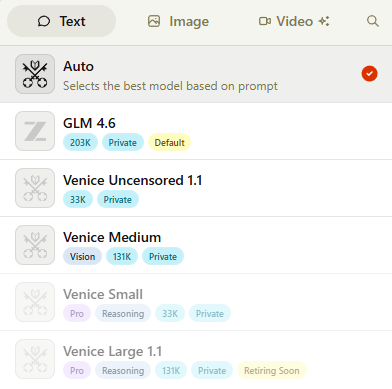
I first heard about Venice AI on a late-night Reddit scroll. People were calling it the best private AI chatbot 2026 because it doesn’t save your chats on any server — everything stays right in your browser or phone app. No training on your data. No creepy data-sharing. Just pure, uncensored AI.
I signed up anonymously (no email needed if you don’t want one) and jumped straight in. Within five minutes I could tell this wasn’t like ChatGPT or Claude. It felt… freeing.
My Hands-On Testing: What I Actually Asked Venice AI to Do
I treated it like a real daily driver. Here’s what happened.
File analysis
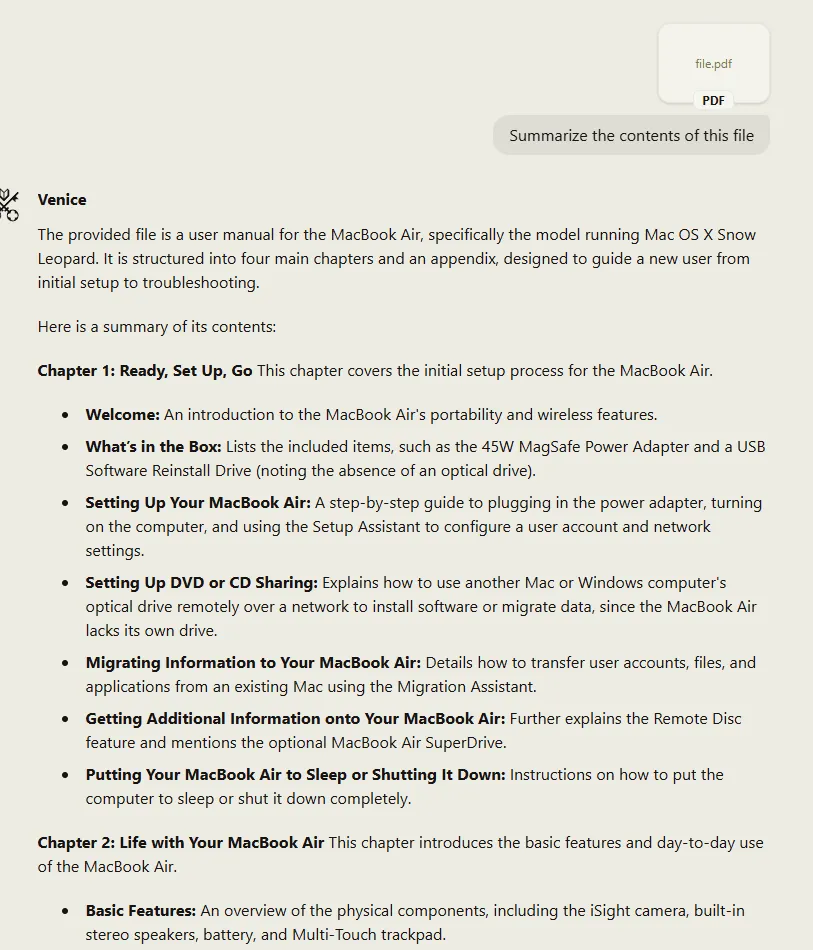
I uploaded a 28-page PDF of my old tax documents (nothing crazy, just boring numbers). Asked for a summary. Boom — clean, perfectly formatted bullet points in under 40 seconds. No hallucinations, no made-up numbers. I actually used the summary the next day.
Coding test
I asked it to build a simple Snake game in Python. It gave me complete, copy-paste-ready code plus installation instructions. I ran it in my terminal and it worked first try. Then I gave it my old messy Bash web-scraper and said “add SSL proxy support and clean it up.” It didn’t just add one line — it rewrote the messy parts and left helpful comments. Mind blown.
Venice AI Image Generator Review – Better Than I Expected
One of my favorite parts was the creative side. I did a deep dive into the Venice AI image generator review side of things and honestly? It’s shockingly good for a privacy-first tool.
I generated everything from cyberpunk cityscapes to product mockups for my side hustle. The Flux 2 Pro model they route to is excellent. I also loved the one-click upscaler and editor right in the chat box. Prompt was 150 characters? It auto-enhanced it for me. Results were clean, detailed, and (most importantly) private.
Venice AI Video Generation – The New Feature That Blew Me Away
2025 brought Venice AI video generation and it’s a game-changer. I typed “slow-motion coffee pour in a rainy Tokyo café, cinematic style” and got a 6-second clip that actually looked pro. Not Hollywood level yet, but perfect for social media or storyboarding. I tried it with image-to-video too — uploaded a photo of my dog and turned it into a cute walking animation. Hours of fun.
Venice AI Uncensored and Venice AI NSFW – Real Freedom
Here’s where it gets interesting. Most AIs shut you down the second you step over some invisible line. Not Venice AI uncensored. I tested the Mature filter (easy toggle) and asked some edgy, adult-themed creative writing prompts and character role-plays. It handled everything without a single refusal or lecture.
And yes — Venice AI NSFW works exactly as advertised. Text, images, even short video clips if you’re on Pro. It felt like talking to an AI that actually treats you like an adult. (Obviously I stayed legal and ethical — just testing the freedom everyone talks about.)
Read More: My Complete Personal Experience with NSFW AI Image Generators in 2026
Venice AI Pricing 2026 – Free Tier Limits and What You Actually Get
I hate hidden costs, so I tracked every single prompt. Here’s the exact breakdown I experienced in Venice AI pricing 2026:
| Plan | Price | Text Prompts | Image Prompts | Video & Advanced Features | Best For |
| Free | $0 | 10 per day | 15 per day | Base models only, watermarks | Testing the waters |
| Pro | $18/month or $149/year | Unlimited | Up to 1,000/day | All models, characters, API, no watermarks, high-res upscaling | Daily users & creators |
Venice AI free tier limits are honest but tight. I hit the wall by lunch on busy days. Upgrading to Pro removed every restriction and gave me 1,000 bonus video credits once. The annual plan saved me $67 right away — worth it if you’re using it more than a couple times a week.
Is Venice AI Safe? My Complete Venice AI Privacy Review
This was my biggest question before signing up: is Venice AI safe?
After digging through their docs and testing for two weeks, here’s my Venice AI privacy review: yes, it’s the real deal. Every chat lives only in your browser or app. Once you close the tab or enable Temporary Chat mode, it’s gone forever — even Venice can’t see it. They only know your email (if you give one) or public wallet key. All traffic is encrypted, and they route compute through decentralized GPUs without ever storing your prompts.
I even logged in from my phone and laptop — no shared history. That peace of mind is addictive.
Venice AI vs ChatGPT – My Side-by-Side Experience
Everyone asks about Venice AI vs ChatGPT, so I ran the exact same prompts on both for a week.
| Category | Venice AI | ChatGPT (Plus) | Winner for Me |
| Privacy | 100% local storage | Stores everything on servers | Venice AI |
| Censorship | Almost none | Heavy guardrails | Venice AI |
| Image/Video Quality | Excellent open models | Very good but censored | Tie (Venice for freedom) |
| Reasoning Consistency | Very good, occasional fluctuations | Slightly more polished | ChatGPT |
| Price | $18/month unlimited | $20/month | Venice AI |
| Best Use Case | Private, creative, sensitive topics | Professional polished work | Depends on your needs |
For anything personal, controversial, or creative, Venice AI wins hands down. For super-polished business reports, ChatGPT still edges it.
Venice AI API Tutorial – Super Simple Even for Beginners
If you’re a developer (or just curious), the Venice AI API tutorial part is ridiculously easy. Here’s exactly what I did:
- Go to your Pro dashboard → API keys.
- Copy the key (looks like any OpenAI key).
- Paste it into Cursor, VS Code, or any OpenAI-compatible tool.
- Change the base URL to https://api.venice.ai and you’re live.
I hooked it into a little private note-taking app in under 10 minutes. Zero extra setup. Works with chat completions, image generation, even speech synthesis.
Learn about: Best Api Search Company’s Homepage
What Real People Are Saying on Venice AI Reddit
I spent an evening reading Venice AI Reddit threads (r/privacy, r/LocalLLaMA, r/ChatGPTJailbreak). The vibe is overwhelmingly positive:
- “Finally an AI that doesn’t lecture me”
- “Privacy actually delivered — my chats disappear”
- “Video generation is addictive”
A few complaints about hitting free limits fast and occasional slower response times during peak hours, but nothing deal-breaking. The consensus matches my experience: great for privacy nerds and creators.
Venice AI Pro Worth It? My Personal Verdict After 14 Days
So… Venice AI Pro worth it?
For me? Absolutely yes. The $18/month feels cheap once you realize you’re getting unlimited private, uncensored access plus video and API. I’ve already generated client mockups, coded small tools, and had fun NSFW creative sessions I’d never try elsewhere.
If you only need 10-15 prompts a day and don’t care about video or characters, the free tier is honestly fine. But the second you start using it seriously, Pro pays for itself.
Final Thoughts – Should You Try Venice AI in 2026?
Look, I went in skeptical. Now I keep Venice AI open in one tab every single day. It’s the best private AI chatbot 2026 I’ve found — hands down.
Whether you want total privacy, real creative freedom, or just an AI that doesn’t feel like it’s reporting back to corporate, Venice AI delivers.
Quick start tip: Head to venice.ai right now, try the free version with a silly prompt, then come back and tell me what you think. I bet you’ll be as hooked as I am.
Got questions? Drop them below — I answer every one. And if this Venice AI review 2026 helped you, share it with that friend who’s always complaining about censored chatbots.
Talk soon,
Your fellow AI explorer
P.S. Still on the fence about Venice AI Pro worth it? Start free. You literally have nothing to lose except your old worries about privacy.